Diamond size chart at actual size: print at 100%
By HeyGema™ · Updated
In short
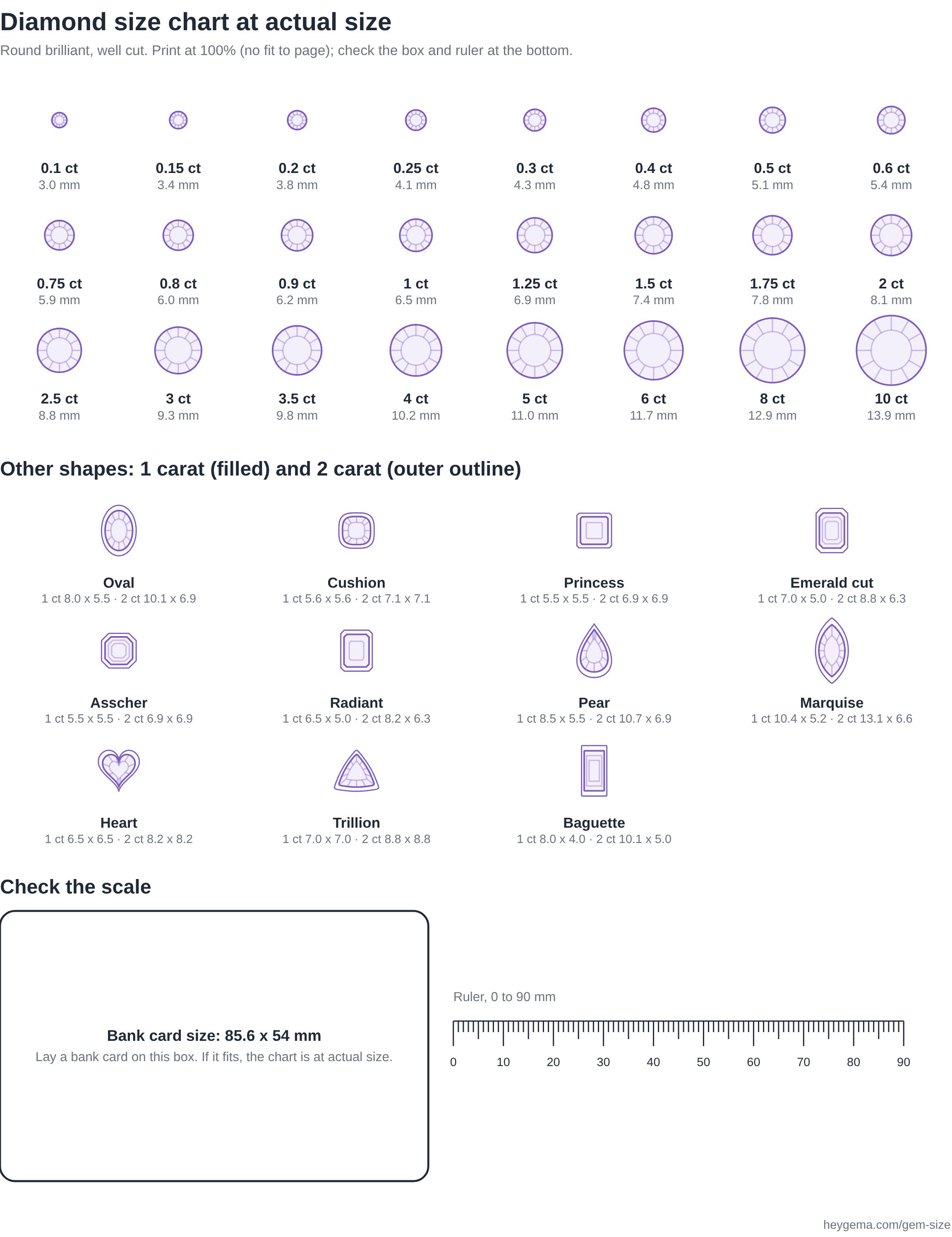
Print this page at 100% and each circle is the real diameter of a round diamond of that weight, from 2.99 mm for 0.1 carat to 13.9 mm for 10 carat. A bank card box and a ruler at the bottom check the scale.
How to print it at actual size
- 1
Open the print dialog
Choose Print on this page, or open the PDF.
- 2
Set the scale to 100%
Turn off Fit to page, Shrink to fit and Scale to fit. Margins can stay default.
- 3
Check the scale
Lay a bank card on the box at the bottom. If its edges meet the box, every stone is at actual size. The ruler beside it should measure 90 mm from 0 to 90 against a real ruler.
- 4
Compare
Place a loose stone or the stone in your ring on the matching circle, or measure your ring's stone with a ruler and read the carat across.
What the chart shows
Each round diamond is drawn at the diameter of a well-cut stone of that weight. The other shapes show a 1 carat stone and, as an outer outline, a 2 carat stone. A stone mounted in a ring is seen from above, so measure across the top of the stone, not the prongs.